Heightfield Generate - Use Shader Tab

Description:
This tab has parameters which let you use a displacement shader to generate height information for the heightfield. You assign a shader and then use the Generate Node button to generate the heightfield from the shader. You will need to regenerate the heightfield whenever you make changes to the assigned shaders.
Using a shader to generate the heightfield data could be useful in several ways. A heightfield might be quicker to render than a complex shader network. You can use it to "capture" the shader displacement so you can export a heightfield to use in another application. The heightfield won't have the same detail as the shader but it could be sufficient. It might be useful as a low resolution stand-in for animating objects in another application for example. You could also load the heightfield for further processing in a heightfield editing appplication.
Settings:
- Shader: This lets you assign a shader to be used to generate height information.
-
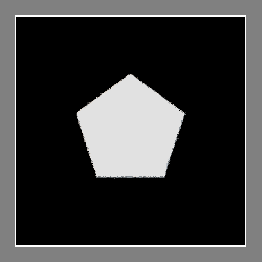
Position center: If this is checked the origin of the shader assigned above is placed in the centre of the heightfield. The image below shows a heightfield generated Simple Shape Shader position in the centre. The origin of the Simple Shape Shader is at the centre of the shape.
-
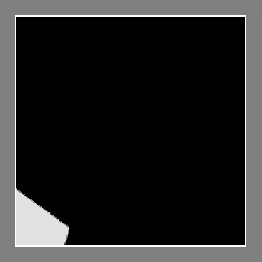
Position lower left: If this is checked the origin of the shader assigned above is placed at the lower left of the heightfield. The image below shows the same Simple Shape Shader used in the image above, but this time it's placed at the lower left.
-
Position: This setting can be used to change the area of the shader which is used to generate the heightfield data. It's an offset from the origin of the shader. For example if you set the X field of the parameter to 500 the area of the shader covered by the heightfield is moved 500 m to the right.
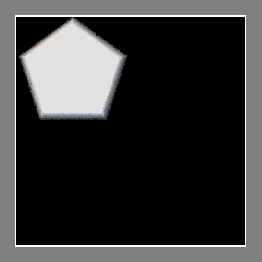
The following image shows a Simple Shape Shader placed at the top left of the generated heightfield using the Position parameter. The heightfield is 10000 x 10000 and the shader is 5000 x 5000. The shader is positioned using its centre. The Position parameter was set to 2500, -2500 to put the shader in that location.


Back to: Heightfield Generate