Planet Atmosphere

Overview
The Planet Atmosphere node provides all the effects of a full planetary atmosphere, including blue sky, the red of sunsets, and distance-enhancing haze. You can control many aspects of the atmosphere to fine-tune or enhance a realistic Earth-like atmosphere, or create completely alien skies. The default scene includes a Planet Atmosphere node. Note that clouds are created separately using the Add Cloud Layer button.
Settings:
- Enable primary: Controls the visibility of the atmosphere itself, primarily manifested as haze. When enabled the camera directly sees the atmosphere, but when disabled causes the sky to become invisible to the camera. If Enable secondary is on, the atmosphere will still affect the lighting on any clouds and the terrain in the project.
- Enable secondary: Responsible for the global illumination, reflections and shadows of the atmosphere. When enabled, shadows and reflections of the atmosphere are rendered. When disabled, they are not rendered, therefore the reddening of the light at sunset won’t be visible or the atmosphere on the dark side of a planet will still be fully lit because the shadows aren't calculated.


Main Tab

Settings:
- Haze density:
- Haze horizon colour:
- Bluesky density:
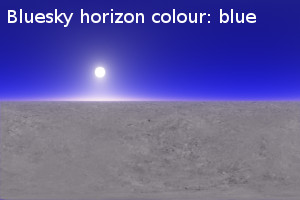
- Bluesky horizon colour:
- Bluesky additive:
- Redsky decay:


Height Control Tab

Settings:
- Haze exp height:
- Bluesky exp height:
- Ceiling adjust:
- Ceiling:
- Floor:
Lighting Tab

Settings:
- Haze glow amount:
- Haze glow power:
- Bluesky glow amount:
- Bluesky glow power:
- Rayleigh phase function:
- Enviro light:
- Enviro light tint:
- Anisotropic enviro light:
- Better cache radius:
Functions Tab

Settings:
- Shadow function:
Tweaks Tab

Settings:
- Ambient:
- Fake dark power:
- Fake dark sharpness:
- Bluesky density colour:
- Redsky decay colour:
- Ozone factor:
- Improved glow model:
- Reset Tweaks:
Quality Tab

Settings:
- Number of samples:
- Adjust to distance:
- Receive shadows from surfaces
Example movies

Example Picture
|
Haze horizon colour: blue |
Haze horizon colour: green |
Haze horizon colour: red |
|
Haze horizon colour: white |
Haze horizon colour: yellow | |
|
Bluesky density: 0.01 |
Bluesky density: 0.5 |
Bluesky density: 4 |
|
Bluesky density: 16 |
Bluesky density: 32 |
Bluesky density: 64 |
|
Bluesky horizon colour: blue |
Bluesky horizon colour: green |
Bluesky horizon colour: red |
|
Bluesky horizon colour: yellow |